Scan the Bangla QR code below to pay seamlessly with any Bangladeshi bank or mobile wallet app.
🇧🇩 BANGLADESH BANK AUTHORIZED
Compatible with bKash, Nagad, Rocket, Upay, Cellfin, and all Bangladeshi bank apps.
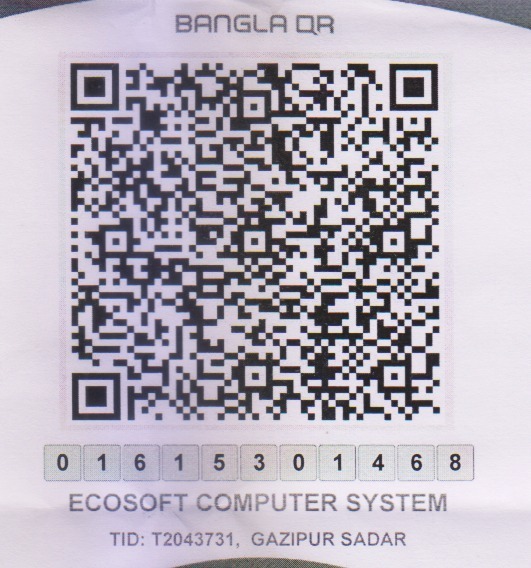
Merchant Name: ECOSOFT COMPUTER SYSTEM
Merchant No: 01615301468
Terminal ID (TID): T2043731
Location: Gazipur Sadar
Open your bKash, Nagad, Rocket, Upay, Cellfin, City Touch, Astha, or any bank mobile app.
Locate and tap the 'Scan QR' or 'Bangla QR' icon on the dashboard of your app.
Point your camera at this QR code. Enter the invoice amount and mention your Invoice / Customer ID in the reference field.
Verify merchant name ECOSOFT COMPUTER SYSTEM and enter your secret PIN to confirm.
After completing your payment, please share your Transaction ID (TrxID) or screenshot via WhatsApp or Email for instant invoice confirmation.
Experience the nationwide standard in seamless, cashless payments.
No need to remember separate personal or merchant accounts. One single QR code accepts payments from 30+ banks and all MFS wallets across Bangladesh.
Direct digital settlement with zero hidden gateway surcharges or extra convenience fees for our valued clients.
Officially authorized and securely routed under the Bangladesh Bank National Payment Switch Bangladesh (NPSB) framework.